Showing posts with label Statistics. Show all posts

Tuesday, 7 April 2015

In Depth: Corrplot function

Corrplot

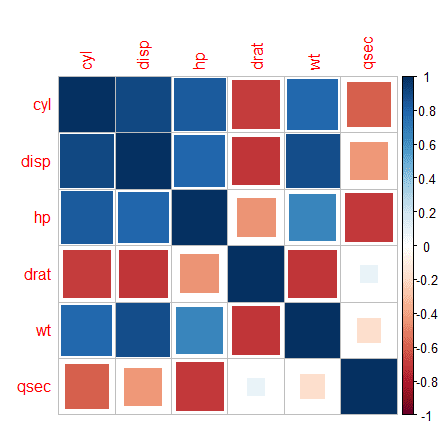
Corrplot is a graphical display for correlation matrix and confidence intervals. We can change the shape, layout, ordering, colour labels etc. using this powerful function. 

For corrplot, to work you need to install the corrplot package. The input to this function will be a correlation matrix. 

R Code - Visualization 

> #Generating the correlation matrix
> correlation <- cor(mtcars[2:7])
> correlation
            cyl       disp         hp        drat         wt        qsec
cyl   1.0000000  0.9020329  0.8324475 -0.69993811  0.7824958 -0.59124207
disp  0.9020329  1.0000000  0.7909486 -0.71021393  0.8879799 -0.43369788
hp    0.8324475  0.7909486  1.0000000 -0.44875912  0.6587479 -0.70822339
drat -0.6999381 -0.7102139 -0.4487591  1.00000000 -0.7124406  0.09120476
wt    0.7824958  0.8879799  0.6587479 -0.71244065  1.0000000 -0.17471588
qsec -0.5912421 -0.4336979 -0.7082234  0.09120476 -0.1747159  1.00000000
> 
> #Generating the plot
> corrplot(correlation)


> #Shape selection
> corrplot(correlation, method = "square")
> # Layout selection 
> corrplot(correlation, type = "lower")

Wednesday, 25 February 2015

Computing Correlation Coefficients in R

Correlation Coefficients


The general formulae to compute correlation coefficient between 2 variables is -


where cov(A,B) is the covariance between A & B and SA and SB are the standard deviations.

Manual Way in R


#Define 2 verctors 
> 
> A <- c(1,2,4,5)
> B <- c(5,6,8,1)
> 
> #Finding Covariance between A & B 
> A_diff <- A - mean(A)
> B_diff <- B - mean(B)
> 
> #Print both the variables created above
> A_diff
[1] -2 -1  1  2
> B_diff
[1]  0  1  3 -4
> 
> #Do the summation and divide by N-1 to get the covariance between the two vectors
> #N = 3 in this case 
> cov <- sum(A_diff*B_diff)/(3-1)
> 
> #Finding the squared difference w.r.t to mean for the vectors 
> A_sq <- A_diff^2
> B_sq <- B_diff^2
> 
> #Using the standard deviation formulae 
> 
> A_sd <- sqrt(sum(A_sq)/(3-1))
> 
> B_sd <- sqrt(sum(B_sq)/(3-1))
> 
> #Print the standard deviation 
> A_sd
[1] 2.236068
> B_sd
[1] 3.605551
> 
> #Plugging in values to find the correlation coefficient
> 
> corr <- cov/(A_sd*B_sd)
> 
> #Printing the correlation obtained - Manual way
> corr
[1] -0.3721042
> 
> #Using formulae for direct computation 
> 
> corr_test <- cor(A,B)
> corr_test
[1] -0.3721042
 Using the in-built function and manual way, we get the same result. 

Tuesday, 3 February 2015

All about Correlation - Part - 2

Is the correlation significant ? 

Note:
This post is in continuation to the post All about correlation - Part - 1
We are using the mtdata set in R.

Now that you have computed the correlation between 2 variables, you need to decide if the value is significant. In other words, the null hypothesis states -

Ho : The correlation is zero
H1: There is significant correlation

In R, we can test this using the function cor.test. This function does the test of association between paired samples, using one of Pearson's product moment correlation coefficient. Neither cor(), nor cov() produce tests of significance, but cor.test() function can be used to test a single correlation coefficient.

R Code


> cor.test(mtcars$hp,mtcars$cyl)
 
 Pearson's product-moment correlation
 
data:  mtcars$hp and mtcars$cyl
t = 8.2286, df = 30, p-value = 3.478e-09
alternative hypothesis: true correlation is not equal to 0
95 percent confidence interval:
 0.6816016 0.9154223
sample estimates:
      cor 
0.8324475 

Scatterplots

R Code

plot(mtcars$wt~mtcars$mpg,main = "Scatterplot",xlab = "Mileage", ylab = "Weight", col = "Blue")


Interpreting Correlations

At times, non representative samples can cause wrong interpretation of the correlations. Thus, it is important to test out this effect by sub-setting the data.  

In the mtcars datset, we have transmission column. It is a categorical variable, which is set to 0 for no transmission and 1 for transmission. 
If we make subsets of our data and then calculate the correlations again, we will observe there will be a difference. Thus, our sample may not be a good representative of the population.

R Code

> #Needed for describeBy function 
> library("psych")
> 
> #To read the first few lines of the datset
> head(mtcars)
                   mpg cyl disp  hp drat    wt  qsec vs am gear carb
Mazda RX4         21.0   6  160 110 3.90 2.620 16.46  0  1    4    4
Mazda RX4 Wag     21.0   6  160 110 3.90 2.875 17.02  0  1    4    4
Datsun 710        22.8   4  108  93 3.85 2.320 18.61  1  1    4    1
Hornet 4 Drive    21.4   6  258 110 3.08 3.215 19.44  1  0    3    1
Hornet Sportabout 18.7   8  360 175 3.15 3.440 17.02  0  0    3    2
Valiant           18.1   6  225 105 2.76 3.460 20.22  1  0    3    1
> 
> #Subseting the data
> subset_trans <- subset(mtcars, am == 1)
> subset_notrans <- subset(mtcars, am == 0)
> 
> #print the subsetted data 
> head(subset_trans)
                mpg cyl  disp  hp drat    wt  qsec vs am gear carb
Mazda RX4      21.0   6 160.0 110 3.90 2.620 16.46  0  1    4    4
Mazda RX4 Wag  21.0   6 160.0 110 3.90 2.875 17.02  0  1    4    4
Datsun 710     22.8   4 108.0  93 3.85 2.320 18.61  1  1    4    1
Fiat 128       32.4   4  78.7  66 4.08 2.200 19.47  1  1    4    1
Honda Civic    30.4   4  75.7  52 4.93 1.615 18.52  1  1    4    2
Toyota Corolla 33.9   4  71.1  65 4.22 1.835 19.90  1  1    4    1
> head(subset_notrans)
                   mpg cyl  disp  hp drat    wt  qsec vs am gear carb
Hornet 4 Drive    21.4   6 258.0 110 3.08 3.215 19.44  1  0    3    1
Hornet Sportabout 18.7   8 360.0 175 3.15 3.440 17.02  0  0    3    2
Valiant           18.1   6 225.0 105 2.76 3.460 20.22  1  0    3    1
Duster 360        14.3   8 360.0 245 3.21 3.570 15.84  0  0    3    4
Merc 240D         24.4   4 146.7  62 3.69 3.190 20.00  1  0    4    2
Merc 230          22.8   4 140.8  95 3.92 3.150 22.90  1  0    4    2
> 
> #Using the describeBy function, need to install the psych package for this 
> describeBy(mtcars,mtcars$am)
group: 0
     vars  n   mean     sd median trimmed    mad    min    max  range  skew kurtosis    se
mpg     1 19  17.15   3.83  17.30   17.12   3.11  10.40  24.40  14.00  0.01    -0.80  0.88
cyl     2 19   6.95   1.54   8.00    7.06   0.00   4.00   8.00   4.00 -0.95    -0.74  0.35
disp    3 19 290.38 110.17 275.80  289.71 124.83 120.10 472.00 351.90  0.05    -1.26 25.28
hp      4 19 160.26  53.91 175.00  161.06  77.10  62.00 245.00 183.00 -0.01    -1.21 12.37
drat    5 19   3.29   0.39   3.15    3.28   0.22   2.76   3.92   1.16  0.50    -1.30  0.09
wt      6 19   3.77   0.78   3.52    3.75   0.45   2.46   5.42   2.96  0.98     0.14  0.18
qsec    7 19  18.18   1.75  17.82   18.07   1.19  15.41  22.90   7.49  0.85     0.55  0.40
vs      8 19   0.37   0.50   0.00    0.35   0.00   0.00   1.00   1.00  0.50    -1.84  0.11
am      9 19   0.00   0.00   0.00    0.00   0.00   0.00   0.00   0.00   NaN      NaN  0.00
gear   10 19   3.21   0.42   3.00    3.18   0.00   3.00   4.00   1.00  1.31    -0.29  0.10
carb   11 19   2.74   1.15   3.00    2.76   1.48   1.00   4.00   3.00 -0.14    -1.57  0.26
-------------------------------------------------------------------------------- 
group: 1
     vars  n   mean    sd median trimmed   mad   min    max  range  skew kurtosis    se
mpg     1 13  24.39  6.17  22.80   24.38  6.67 15.00  33.90  18.90  0.05    -1.46  1.71
cyl     2 13   5.08  1.55   4.00    4.91  0.00  4.00   8.00   4.00  0.87    -0.90  0.43
disp    3 13 143.53 87.20 120.30  131.25 58.86 71.10 351.00 279.90  1.33     0.40 24.19
hp      4 13 126.85 84.06 109.00  114.73 63.75 52.00 335.00 283.00  1.36     0.56 23.31
drat    5 13   4.05  0.36   4.08    4.02  0.27  3.54   4.93   1.39  0.79     0.21  0.10
wt      6 13   2.41  0.62   2.32    2.39  0.68  1.51   3.57   2.06  0.21    -1.17  0.17
qsec    7 13  17.36  1.79  17.02   17.39  2.34 14.50  19.90   5.40 -0.23    -1.42  0.50
vs      8 13   0.54  0.52   1.00    0.55  0.00  0.00   1.00   1.00 -0.14    -2.13  0.14
am      9 13   1.00  0.00   1.00    1.00  0.00  1.00   1.00   0.00   NaN      NaN  0.00
gear   10 13   4.38  0.51   4.00    4.36  0.00  4.00   5.00   1.00  0.42    -1.96  0.14
carb   11 13   2.92  2.18   2.00    2.64  1.48  1.00   8.00   7.00  0.98    -0.21  0.60
> 
> #Finding correlation in both the groups
> corr <- cor(mtcars$mpg,mtcars$wt)
> corr
[1] -0.8676594
> corr_trans <- cor(subset_trans$mpg,subset_trans$wt)
> corr_trans
[1] -0.9089148
> corr_nontrans <- cor(subset_notrans$mpg,subset_notrans$wt)
> corr_nontrans
[1] -0.7676554
> #Combine all the results 
> Correlation <- cbind(corr,corr_trans,corr_nontrans)
> # Notice the difference in correlation for the same set of variables but differently grouped/ subsetted 
> Correlation
           corr corr_trans corr_nontrans
[1,] -0.8676594 -0.9089148    -0.7676554

Thus, the sample should always be representative of the population. Any kind of sub-setting can change the correlation that is derived as such. 


Wednesday, 21 January 2015

R Basics: Graphics in R

R is a powerful tool which can be used to make amazing graphics for representing your data.This post is going to just scratch the surface of the most commonly used graphics.

BOXPLOT: It is used for quantitative variables and its goal is to give you an idea of the distribution of the data. The upper and the lower bounds of the box represent the 75th percentile and the 25th percentile respectively. The black line is seen to be towards the top which means the distribution is asymmetric.
Dataset Source: http://datamarket.com/data/set/12sc/infant-mortality-rate#!

#Graphical Plots in R 
install.packages('knitr')
library(knitr)
infant_mortality<-read.csv("infant-mortality-rate.csv")
dim(infant_mortality)
[1] 92  4
#Reading first few lines of datahead(infant_mortality)
  Year Australia India Pakistan
1 2010     4.437 50.58    71.35
2 2011     4.437 50.58    71.35
3 2012     4.437 50.58    71.35
4 2013     4.437 50.58    71.35
5 2014     4.437 50.58    71.35
6 2015     4.437 50.58    71.35
#Boxlpot
boxplot(infant_mortality$India,col="red")
boxplot
#Seeing the summary statistics of the dataset
summary(infant_mortality)
      Year      Australia        India         Pakistan   
 2010   : 1   Min.   :4.44   Min.   :50.6   Min.   :71.3  
 2011   : 1   1st Qu.:4.44   1st Qu.:50.6   1st Qu.:71.3  
 2012   : 1   Median :4.44   Median :50.6   Median :71.3  
 2013   : 1   Mean   :4.44   Mean   :50.6   Mean   :71.3  
 2014   : 1   3rd Qu.:4.44   3rd Qu.:50.6   3rd Qu.:71.3  
 2015   : 1   Max.   :4.44   Max.   :50.6   Max.   :71.3  
 (Other):86   NA's   :1      NA's   :1      NA's   :1  
#Boxplot for comarisons#Compares mortality rate VS  Year
 boxplot(infant_mortality$Pakistan ~ as.factor(infant_mortality$Year),col="blue")
boxplot1

Dataset Source: http://datamarket.com/data/set/vih/retail-prices-of-some-commodities-and-services-1996-2013#!
 #Barplot 
retail_prices<-read.csv("retail-prices-of-some-commoditie.csv")
head(retail_prices)
    Month Dairy.cheese Dark.chocolate Eggs Grapes
1 1996-11          701            190  348    447
2 1997-02          736            188  360    593
3 1997-05          742            189  360    381
4 1997-08          747            191  359    375
5 1997-11          758            194  360    479
6 1998-02          786            192  341    378
barplot(table(retail_prices$Eggs),col="red")

barplot
  #Histogram  hist(retail_prices$Eggs,col="blue",breaks=50) 

histogram
#Density Plots

#Density plots are smoothed histograms
 dens<-density(retail_prices$Eggs) 
#lwd is for line thickness 
#Density plots the percentage of observation instead of absolute numbers 
plot(dens,lwd=3,col="blue") 
#Density plots - Multiple Distributions 
dens_grapes<-density(retail_prices$Grapes) 
lines(dens_grapes,lwd=3,col="orange")
density
#Timeseries 

#Install the following package to plot a timeseries
install.packages("astsa")
library(astsa)

#start parameter is used to indicate the year on x-axis
retail_prices_timeseries<-ts(retail_prices$Eggs,start=c(1961,1))
plot(retail_prices_timeseries,,col="blue",lwd=3)

#To plot multiple timeseries on same graph for comparison 
retail_prices_timeseries1<-ts(retail_prices$Dark.chocolate,start=c(1961,1))
#Lines command is used to overlay multiple plots on same graph
lines(retail_prices_timeseries1,col="red",lwd=3)
retail_prices_timeseries2<-ts(retail_prices$Grapes,start=c(1961,1))
lines(retail_prices_timeseries2,col="green",lwd=3)
retail_prices_timeseries2<-ts(retail_prices$Dairy.cheese,start=c(1961,1))
lines(retail_prices_timeseries2,col="yellow",lwd=3)
Timeseries

Wednesday, 14 January 2015

All about Correlation - Part 1

What is Correlation ? 

Correlation indicates how strongly are 2 variables associated. Correlation,however does not imply causation. The value of correlation varies between 0 & 1.

Correlation does not mean causation


Using a R dataset - mtcars to understand correlation deeper.

> #To read the first few lines of the datset
> head(mtcars)
                   mpg cyl disp  hp drat    wt  qsec vs am gear carb
Mazda RX4         21.0   6  160 110 3.90 2.620 16.46  0  1    4    4
Mazda RX4 Wag     21.0   6  160 110 3.90 2.875 17.02  0  1    4    4
Datsun 710        22.8   4  108  93 3.85 2.320 18.61  1  1    4    1
Hornet 4 Drive    21.4   6  258 110 3.08 3.215 19.44  1  0    3    1
Hornet Sportabout 18.7   8  360 175 3.15 3.440 17.02  0  0    3    2
Valiant           18.1   6  225 105 2.76 3.460 20.22  1  0    3    1
> 
> #To generate a correlation matrix
> correlations <- cor(mtcars[2:6])
> #Round function can also be used
> # correlations <- round(cor(mtcars[2:6]),2) - Will round to 2 decimal digits
> #Print the result
> correlations
            cyl       disp         hp       drat         wt
cyl   1.0000000  0.9020329  0.8324475 -0.6999381  0.7824958
disp  0.9020329  1.0000000  0.7909486 -0.7102139  0.8879799
hp    0.8324475  0.7909486  1.0000000 -0.4487591  0.6587479
drat -0.6999381 -0.7102139 -0.4487591  1.0000000 -0.7124406
wt    0.7824958  0.8879799  0.6587479 -0.7124406  1.0000000
> 
> #To create a visual plot of the correlations
> corrplot(correlations)
> 

Correlation matrix


Labels